12.03.2009

Kamis, 03/12/2009 12:00 WIB
Ucok AKA Dimakamkan di Dekat Rumah Baru
Steven Lenakoly - detikhot

Gambar
Ucok AKA (yla/hot)
Surabaya Sebelum meninggal, rocker legendaris Ucok AKA sempat membeli sebuah rumah di kawasan Jl. Mastrip, Surabaya. Rumah tersebut rencananya akan ia tempati setelah dirinya diperbolehkan pulang dari rumah sakit.

Sayang, belum lagi pulang ke rumah barunya, AKA pergi untuk selamanya, Kamis (3/12/2009) pagi. Pada sahabat dan keluarganya, ia sempat berpesan agar dimakamkan di dekat rumah barunya.

"Akhirnya kami dan keluarga berunding memutuskan untuk memakamkan Ucok di TPU Kebraon Tegal," ujar salah satu sahabat AKA, Mas Yus, saat ditemui di Balai RT O1/RW 01, Kebraon Tegal, Surabaya, Kamis (3/12/2009).

Rencananya sebelum dimakamkan, AKA akan disemayamkan di Balai RT 01/RW 01 Kebraon Tegal. Sampai saat ini, jenazah AKA belum sampai di balai tersebut. Pelayat juga belum terlalu banyak di sana.

Ucok AKA meninggal dalam usia 69 tahun di RS Dharmo, Surabaya, Kamis (3/12/2009) pagi. Ia meninggal setelah sebelumnya berjuang melawan penyakit kanker paru-paru.

(eny/eny)


info : detik.com

SAWUNGGALING ENTERPRICE

11.30.2009


 SAWUNGGALING studio,music school,warnet,dan resto......

studio SAWUNG GALING
menerima recording life dan semi life dengan harga terjangkau.dengan kenyamanan yang mungkin belum ada rasakan sebelumnya dari studio music lainnya....dengan sewa rental terjangkau Rp. 23.000  dengan spek alat yang baik bagi anda yang ingin mendemo semi track cukup hanya Rp. 75.000........


bagi anda yang boring menunggu jam latihan anda kami menyediakan resto dan warnet yang tak kalah murah dengan warnet dan resto lainnya...... mau boking??? buruan aja telpon ke (021-8215685)sawung galing studio...


bagi yang mau lesson music bisa aja kami menyediakan guru yang berpotensi dan tentunya asik tuk lebih mudah memahami pelajarannya....penasaran????? buruan aja telpon ke (021-8215685)sawung galing studio...

NNNNAAAAAHHHHHH untuk para EO kami juga menyediakan rental alat keluar... dengan harga terjangkau dan kualitas yang baik....... buruan aja telpon ke (021-8215685)sawung galing studio...

...ok PLAY YOUR MUSIC IF YOU MUCICIAN,,, and RECORD your SONG if you want to BE a STARS!!!!!!!!!!!!!    DONT BE LATE.......SEEYAAAAA

KARTUN NABI MUHAMMAD


PARAH ISLAM TERINJAK-INJAK.......KEMBALI DILECEHKAN ISLAM....


Jakarta (GP-Ansor): Belum lagi reda soal kartun Nabi Muhammad, sebuah kartun baru telah menuai kemarahan partai oposisi Malaysia dan organisasi non-pemerintah. Gara-garanya, koran New Straits Times memuat kartun yang dianggap mengejek kemarahan umat muslim atas kartun Nabi Muhammad.

Harian Malaysia tersebut pada Senin (20/2/2006) lalu mempublikasikan kartun karya Willie Miller, yang menggambarkan seorang kartunis pinggir jalan sedang duduk di dekat plang bertuliskan “Caricatures of Mohammed while you wait”.

Sebaris kalimat dibubuhi pada kartun itu. Bunyinya: “Kevin akhirnya mencapai tujuannya untuk menjadi orang yang paling ditakuti di dunia…”
“Kartun ini secara langsung menghina nabi kami,” cetus Salahuddin Ayub, kepala sayap pemuda Pan-Malaysia Islamic Party (PAS), sebuah partai oposisi Malaysia.
“Kami telah mengajukan laporan ke polisi soal ini,” imbuhnya seperti diberitakan kantor berita AFP, Rabu (22/2/2006).
Surat kabar New Straits Times telah menuliskan pembelaan atas pemuatan kartun tersebut pada edisi Rabu 22 Februari ini. Ditegaskan, pihaknya tidak memuat karikatur Nabi Muhammad yang telah menimbulkan aksi protes berdarah di sejumlah negara Islam.
Namun Salahuddin tidak puas dengan penjelasan New Straits Times. “Saya tidak puas. Itu (kartun) masih menyampaikan pesan yang sama (menghina nabi),” ujarnya.
“Koran itu harus minta maaf secara terbuka kepada umat muslim Malaysia. Jika mereka tidak melakukannya dalam waktu 24 jam, kami akan mengorganisir demonstrasi damai pada Jumat nanti di kantor pusatnya,” tegas Salahuddin.
Kantor berita Malaysia, Bernama memberitakan, tiga organisasi non-pemerintah juga telah mengadukan komplain ke polisi terhadap New Straits Times.
Belum lama ini pemerintah Malaysia telah menghentikan untuk sementara izin terbit dua koran lokal karena memuat ulang kartun Nabi Muhammad. Kartun kontroversial itu pertama kali dimuat oleh koran Denmark, Jyllands-Posten pada September 2005. (Detikcom/hr)

UN tetap DIADAKAN!!!!

11.27.2009

Bagaimana bisa terjadi.tersirat kabar lalu ujian nasional atau orang biasa menyebut (UN) akan di tiadakan.. tapi bagaimana caranya hal ini bisa tetap dijalankan???

              pemerintah sendiri belum pasti menentukan UN itu akan tetap dihapus atau di hilangkan...para pemerintah beranggapan,"percuma diadakan UN kalau masi banyak pengangguran.atau bahkan memperbanyak pangangguran...."ujar beberapa menteri.namun dibalik itu semua beberapa siswa juga ada yang setuju dan tidak setuju. sebagian besar siswa yang setuju beranggapan kalau UN itu hanyalah rekayasa pemerintah agar yang dapat duduk di kursi DPR hanyalah kawan dekat mereka saja,ada juga yang beranggapan,bahwa UN itu merupakan sosok yang mendesak pola berfikir siswa yang belum begitu pintar untuk lulus ujian dan mamacu siswa tuk malas sekolah karena kemampuan yang tidak seimbang dengan siswa yang lainnya yang jauh lebih pintar.dan akhirnya para siswa itu putus sekolah dan menambah data orang yang menjadi pengangguran.

           namun segelintir orang beranggapan UN harus diadakan karena mereka akan merasa percumah apabila selama tiga tahun mereka belajar tak ada hasil yang dapat dilihat oleh semua orang.....dan ini menyebabkan sebagai ajank gengsi dalam dunia pendidikan.

sekarang bagai mana pendapat anda?????

Rush Band

11.25.2009


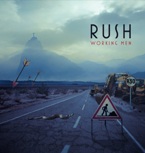
Not many bands have had the audacity to release a best of their live albums and even fewer have had the sort of recent live career that Rush have done. 35 years into their career and Rush are still releasing new albums and are probably as relevant musically as they have ever been - 'Snakes & Arrows’ boasted three or four tracks that are already Rush classics.

'Working Men’ features numbers from three of their various live albums from the recent past – tracks from 'Rush In Rio’, 'R30’ & 'S&A Live’ plus a previously unreleased version of 'One Little Victory’ that was probably recorded on the Snakes & Arrows tour last year.

But is it any good? Well – yes. Rush live are a wonderful experience and they are justifiably proud of their back catalogue and it is true that every tour has its own identity. But it is also true that these tracks have been collected more times that a Paris model’s knickers and most diehard Rush fans will already have the three live albums this collection is culled from.

It is really useful to have the three live sets reduced to a single CD and hearing '2112’ from the 'Rush In Rio’ set alongside 'Working Man’ from 'R30’ or a stunning version of 'Tom Sawyer’ from the 'S&A Live’ set it a good way to hear the progression of the band.

If you aren’t a diehard fan then this is simply a bloody good live set fromone of the best live bands on the planet.

tips membuat header blog dengan image sendiri

11.24.2009

Buat teman-teman yang lagi asyik-asyiknya ngeblog atau ngutak-atik website, dah pada punya gambar header sendiri belum? Itu lho, gambar yang ada pada atas halaman, yang terlihat pada semua halaman… Kalau belum punya, ini ada tutorial sederhana tentang cara membuat gambar header cantik dalam 3 menit dengan Xheader, tidak perlu jago design grafis atau pinter photoshop kok :) , software ini simple dan mudah dimengerti, dan yang pasti gratis atau freeware.

Software Xheader dapat didownload di:

* situs resmi http://www.xheader.com/ atau
* softpedia: xheader

File installer 32.6 Mb, untuk mempercepat download bisa gunakan DAP.

1. Membuat header dari template

Xheader memberikan ribuan template gambar header gratis siap pakai yang bisa Anda pilih. Untuk membuat gambar header dari template buka menu File -> New. Kemudian pilih load from template library.

2. Mengatur ukuran gambar header

Anda bisa mengatur ukuran gambar header sesuai dengan blog Anda melalui menu Option - > Resize Header. Untuk blog di wordpress.com, ukuran gambar header terlihat pada menu Appearance -> Custom Image Header.

3. Memasukkan teks

Setelah Anda memilih template atau gambar header yang tersedia, Anda bisa memulai memasukkan teks. Anda bisa menambah dengan efek outline, chisel, emboss, dan glow. Jika akan menambah efek, pilih teks yang akan diedit dengan menu select terlebih dahulu.

4. Memasukkan gambar dari komputer

Anda bisa memasukkan gambar dari komputer (harddisk, flashdisk, dsb) dengan menggunakan tool Image.


5. Membuat garis, kotak, dan lingkaran

Anda bisa menambahkan garis, kotak, dan lingkaran dengan tool. Objek ini juga dapat diberi efek!

6. Mengatur urutan peletakan objek

Sebuah gambar, bidang, atau tulisan dapat diletakkan di atas atau di bawah yang lain. Anda bisa memilih objek dengan tool Select (paling kiri) dan mengaturnya urutan peletakan objek melalui tool To Front atau To Back.

7. Mengatur efek transparan dan bayangan

Text atau gambar dapat diatur agar transparan (tembus pandang) dan ada bayangannya dengan tool yang tersedia.

8. Preview dan menyimpan Gambar

Sebelum Anda menyimpan gambar header, Anda bisa mencoba melihat tampilan gambar header Anda di browser, buka menu Options -> Preview in Browser. Setelah semua oke, simpan gambar Anda melalui menu File -> Save JPG. Atau File -> Save XHF. File JPG siap di-upload ke blog Anda, sedangkan file XHF bisa diedit ulang jika Anda mau.

Selamat mencoba!

suka cinta sayang

Pernah gag sih kamu mengertikan arti kata SUKA,CINTA,SAYANG ??


pernah gag kalian ngerasa beda antara 3 hal tersebut???

disini bukan sok tau.. tapi yah menurut gw suka cinta dan sayang itu beda banged...

pertama

KALO SUKA itu = tertarik akan sesuatu.
CTH : lo punya pulpen atau lo melihat boneka lucu. pasti lo pengen milikinnya kan?

NAH kalo CINTA itu = hanya ingin memiliki aja
CTH : lo pasti cinta ma org dan ingin memiliki org itu... sama halnya sama lo mencintai sesuatu hal./ lo pasti akan berusaha tuk memilikinya walau taruhan nyawa....


TAPI KALO SAYANG itu = menjaga suka dan CInta itu tidak akan berubah oleh,karena,atau sebab apapun........

KALO cinta gag sayang maka apa itu bisa jadi jaminan...

ok SEKIAN dulu pembahasan ini... lanjut lagi lain waktu ya.....


tapi setiap org pasti beda pendapat... di mohon pendapatnya key...

Tugas Teori Organisasi Umum

1. Apa yang anda ketahui mengenai komunikasi ? Dari ketiga pengertian tentang komunikasi yag dikemukakan oleh Keith Davis, Chester I Barnard maupun Koontz and O’Donnel mana yang cenderung saudara setuju ? Mengapa ?

Jawab:
Menurut saya, komunikasi yaitu dengan adanya komunikasi maka seseorang bisa berhubungan dengan orang lain dan saling bertukar pikiran yang bisa menambah wawasan seeseorang dalam bekerja atau menjalani kehidupan sehari-hari.
Dari ketiga tokoh tersebut saya memilih : Koontz and O’Donnel karena informasi itu akan berpindah-pindah ke orang lain melalui komunikasi 1 sama lainnya.

2. Apa saja yang menjadi komponen penting agar komunikasi berjalan dengan lancar ?

Jawab:
a) Harus ada si pembawa berita atau biasa disebut komunikator (sender).
b) Harus ada si penerima berita atau biasa disebut komunikan (Receiver).
c) Berita atau informasi yang akan disampaikan.

3. Jelaskan syarat-syarat yang harus dipenuhi suatu komunikasi agar komunikasi tersebut berjalan dengan baik dan berhasil ?

Jawab:
Syarat-syarat yang harus dipenuhi :
• Jelas yaitu dinyatakan ke dalam bahasa yang dimengerti oleh si penerima berita.
• Tepat yaitu dalam hal orang yang dituju untuk diberi berita atau informasi yang perlu disampaikan.
• Sasaran yaitu tujun pemberi berita atau informasi sebaiknya sesuai dengan yang diharapkan si pengirim.

4. Jelaskan perbedaan antara One Way Trafic dan Two Way Traffic. Berikan contohnya !

Jawab:
One Way Traffic (komunikasi yang tidak secara langsung) adalah komunikasi satu arah yang artinya komunikasi ini terjadi bila seseorang yang mengirim berita tidak bermaksud untuk menerima umpan balik (respon) dari orang yang menerimanya secara langsung. Jadi hanya bermaksud memberikan informasi atau menyampaikan perintah dari atasan untuk dikerjakan karyawan.
Contoh : Acara berita di televisi merupakan contoh dari komunikasi secara tidak langsung karena kita hanya bisa melihat si pembawa berita dan mendengarkan berita – berita apa saja yang dia sampaikan.
Two Way Traffic adalah komunikasi yang terjadi antara seseorang dengan yang lain dimana kedua orang tersebut sama-sama aktif dalam memberikan tanggapan. Jadi baik komunikator maupun komunikan sama-sama aktif dalm berinteraksi.
Contoh : Biasanya dilakukan diantara sesama teman atau sesama karyawan yang berada alam tingkatan struktur organisasi yang sama.

5. Jelaskan bagaimana cara menghitung jumlah arus tata hubungan yang ada dalam suatu organisasi yang anggotanya selalu bertambah menurut J E Walters ? Berikan contohya ?

Jawab:
Rumus yang digunakan adalah : R = N ( N – 1 )
Keterangan : R adalah relationship yaitu tata hubungan yang terjadi sebagai akibat bertambahnya jumlah orang yang melakukan komunikasi.
N adalah Number yaitu jumlah yang artinya jumlah orang yang ada dalam organisasi atau jumlah anggota organisasi atau bisa juga jumlah unit kerja dalam organisasi.
Contohnya : R = 4 ( 4 – 1)
= 4 x 3
= 12

6. Jelaskan perbedaan komunikasi langsung dan tidak langsung. Dari kedua komunikasi tersebut mana yang lebih baik ? Mengapa demikian?

Jawab:
• Komunikasi langsung adalah komunikasi yang dilakukan dalam menyampaikan berita, laporan maupun perintah antara si pengirim berita (komunikator) kepada si penerima berita (kominikan) dilakukan secara langsung, sehingga kalau si penerima berita melakuakan repon umpan yang baik terjadi juga diterima oleh si pengirim berita juga secara langsung ( pada ssat itu juga ).

• Komunikasi tidak langsung adalah komunikasi yang terjadi jika dalam penyampaian berita tidak dilakukan secara langsung, hanya melalui orang lain ataupun secara tertulis. Komunikasi ini mengakibatkan umpan balik yang terjadi juga tertunda.

• Yang lebih baik antara komunikasi langsung dan tidak langsung menurut kami yang lebih baik yaitu komunikasi secara langsung karena komunikasi dilakukan secara langsung dan bertatap mata dengan pembicara 1 sama lainnya.

7. Apa manfaat yang bisa diperoleh kalau seorang manajer bisa memanfaatkan “The Grapevine” yang ada pada suatu organisasi ?

Jawab:
Jadi, agar komunikasi informal bisa bermanfaat maka seorang pemimpin harus bisa memakai jalur ini untuk memperlancar berjalannya komunikasi formal perusahaan, komunikasi informal jangan sampai mengakibatkan timbulnya desas desus yang meresahkan karyawan.

8. Jelaskan sumbangan komunikasi terhadap terciptanya koordinasi dalam suatu organisasi ?

Jawab:
Dalam membina kerja sama dalam kelompok inilah yang nantinya digunakan dalam rangka membina koordinasi kesatuan gerak dan arah yang sesuai dengan arah dan tujuan organisasi. Agar tercapai koordinasi dalam kerjasama itu sangat penting dilaksanakannya komunikasi yang setepat-tepatnya dan seefektif mungkin sehingga koordinasi dan kerja sama benar-benar dapat dilaksanakan setepat-tepatnya juga. Pengambilan keputusan juga sangat memerlukan komunikasi yang setepat-tepatnya, karena dalam akhir dari pengambilan keputusan tersebut hendaknya juga merupakan pencerminan dari adanya koordinasi dan kerja sama yang tercipta dalam lingkungan perusahaan atau lingkungan organisasi.

9. Gambarkan hubungan antara komunikasi, bekerja sama dan koordinasi. Apa manfaat yang bisa diperoleh dengan mengetahui hubungan antara ketiganya tersebut ?

Jawab:
Koordinasi adalah bekerja bersama seerat-eratnya dibawah seorang pemimpin dimana dalam kerjasama diperlukan komunikasi demi penyelenggaraan tugas dan fungsi masing-masing dalam mencapai sasaran dan tujuan organisasi.
Manfaatnya agar tercapai/membentuk koordinasi dalam kerjasama yang baik maka sangat penting dilaksanakan komunikasi antara para anggota organisasi yang setepat-tepatnya dan seefektif mungkin sehingga koordinasi dan kerjasama benar-benar dapat dilaksanakan setepat-tepatnya juga.

10. Apa yang anda ketahui tentang hubungan komunikasi dalam sistem informasi manajemen ?

Jawab:
Sistem informasi manajemen adalah suatu sistem formal mengenai hal melaporkan, menggolongkan dan menyebarkan informasi kepda orang yang tepat dalam suatu organisasi dan organisasi tidak mungkin berada tanpa komunikasi. Jadi komunikasi diperlukan dalam sistem informasi manajemen.

New moon,eclipse

Kirsten ProutPopEater.ca recently interviewed Eclipse newcomer Kirsten Prout (aka Lucy, one of the vamps that changes Jasper).
In the new interview they discuss how Kirsten landed the role of Lucy, and she gives what little Eclipse details that she could (but they are new details!) -
I hear you are a bit of a bookworm. Did you read the books before this all happened?
“I’d read all the books beforehand, because my sister is not a very big reader. We’re complete opposites. She’s completely inclined towards math. And I’m kind of an avid reader. So I saw her reading and I was like, ‘What are you reading that’s holding your interest?’ And she said, ‘Oh, there’s this series called ‘Twilight’.’ So I went and I borrowed her books. And I read one a day. I just shot through them.”
I actually wanted to ask you about the audition process. Did you go after this one? Did you get the call?
“I just got the call. I went for one of the other vampires, Bree, and the vampire Bree is supposed to be thirteen years old with very short brown hair. So physically I was absolutely wrong for the part. But I went in, and the casting director and the director liked me so much that they said, ‘OK, you know what? We have another part.’ So they fit me in through that audition, into Lucy, who is also a newborn vampire, and she actually is the one who turns Jasper, which is interesting. The thing about Lucy is that she has long blond hair and very very pale blue eyes and skin, so physically I was a big match for Lucy. I went in for one more audition for Lucy and I ended up showing up on set a few days later.”
From what I recall, Lucy is described, but you don’t actually see a lot of her…is that right?
“The thing is, if you read the book, it’s done in a very different way. In the book, it’s kind of a flashback. In the book she’s more of a vampire who…she was just kind of part of turning Jasper, whereas in the movie, it’s kind of featured, and it’s actually a scene, and Lucy is a lot more prominent in turning Jasper, so it’s a bit different. But I can’t tell you much.” [laughs]
I’m assuming, since it was 1863 when Jasper is turned…
“Wow, look at you!”
[laughs] It’s been a while since I read them, so I did my homework. You’re in period costume then?
“Yeah, well, I mean, again, I can’t really tell you too much, but it was cool because I’ve never actually done anything period. You look at my past parts and they’ve been ninja and girl-next-door and crazy random stuff. But I’ve never ever done a period piece, so for me, this whole project, being able to do a period piece was huge for me. And to have a character that was back in time was a lot of fun.”
Because the character is being done a bit differently than it was in the book, did you have any leeway to create the character? Everyone else has a pretty detailed character description.
“I think we’ve all played vampires differently. The way I think about it, everyone is so different. I think about how some people express their hunger, some people express love, some people express all there emotions, they have these certain characteristics that, when they’re hungry or when they love something, their reaction to it is so different, so playing a vampire was interesting for me. Because who’s the authority on what it’s like to smell blood?”
[laughs] You make a good point there.
[laughs] “And how do you react to that, right? So we all kind of took our own approach. Do you seduce your prey? Do you scare them so they’re scared stiff? Do you seduce ‘and’ terrify them? It was something to play with that was definitely fun because you’re playing make believe. Which is the most fun as an actor.”
So will you be doing any stunts in ‘Eclipse’?
“Um, yeah. I mean, there are lots of stunts in the movie. I can’t really disclose a lot, so…” [laughs]
Yeah, I’m sure that non-disclosure agreement was ‘huge’!
“Oh my god! You should have seen it! My agent was like, ‘Yay, you’ve got the part. You just have to come in and sign a couple things.’ I went in and there was this stack on the desk that was bigger than my entire head! And I was like, ‘Holy crap!’” [laughs]


MTV.com has new interviews from some of our favorite Cullen’s: Peter Facinelli (aka Carlisle Cullen), Ashley Greene (aka Alice Cullen), Kellan Lutz (aka Emmett Cullen), and Nikki Reed (aka Rosalie Hale).They all tell MTV what their favorite Eclipse scenes are -
‘Eclipse’ is my favorite book, so I’m actually really excited for people to see that one,” Peter Facinelli, who plays Carlisle Cullen, told MTV News. “The Cullens get to roll up their sleeves and really get into the mix of things. They’re usually so restrained all the time, and I think people love the ['Twilight'] baseball scene because you got to see them actually do what they can do as vampires, and in ‘Eclipse’ it’s that to the 10th power. You get to see them be what they can be as vampires.”Fellow Cullen Ashley Greene is also keen on displaying Alice Cullen’s skills. “I’m really excited to see my fight sequence,” she said. “There’s some playful moments between Jasper and Alice that I’d like to see. They take parts of your character and put it into your fight sequence, so mine’s kind of a Cirque du Soleil-ish sequence, so I want to see it.”
Kellan Lutz looks forward to seeing the results of his hard work preparing to send Emmet into battle. “We went through the six weeks of fight training … and they trained us so well that we just dominated our choreography moves,” he shared. “And they’re going to look really cool.”
But while everyone seems excited to duke it out, Nikki Reed is most looking forward to sharing Rosalie’s tragic backstory. “Well, Jackson [Rathbone] and I, we both had the opportunity to shoot our backstory, so I shot an entire sequence in the 1930s,” she explained. “And it’s intercut between a really amazing scene and moment that I have with Bella. And Jackson sort of did the same. I think the fans will like that. I think they want to see the Cullens’ history. It gives me the opportunity to explain myself.”
Holy Eclipse news day! lol We’ve had tons of updates :D I’m totally looking forward to Eclipse. But could someone PLEASE have the leg hitch scene as their favorite?! That way we know for sure it was filmed!
{ 67 Comments }

Twilight Saga Fans Speak Out – ‘Eclipse is Going to be Epic’


MTV.com has an interview with Twilight Saga fans who recently seen New Moon, and are now super pumped for Eclipse -
“I didn’t know if ['New Moon'] was going to be any good, where I feel like ‘Eclipse’ is going to be epic,” Jordana de la Cruz gushed to MTV News after catching “New Moon” on opening night. “And they kiss in it, Jacob and Bella!”
“I’ve always been excited for ‘Eclipse,’ because that’s my favorite book, but now that the whole cliffhanger is out there, definitely, I’d say a lot of people really want to see it,” Habiba Tinubu said.
Twilighters agreed that with each film, the franchise keeps stepping up its game, so that means tons of excitement is also bubbling up for “Breaking Dawn,” the final book in the series. “[I'm excited for] ‘Breaking Dawn’ because this movie also anticipates you for ‘Breaking Dawn,’ ” another fan said. “When you get to the ending, you’re like, ‘Can’t wait!’ “

Melissa Rosenberg Reveals Details on Eclipse

Eclipse screenwriter Melissa Rosenberg talks with MTV’s Hollywood Crush and reveals some details about Eclipse and about the vampire cameo of new wave rocker Peter Murphy.  We previously posted an interview with Billy Burke (Charlie Swan) where he talks about this special cameo from Peter Murphy in Eclipse.
Looking forward to the flashbacks scenes with Rosalie, Jasper and the wolves origin!  And Bella picturing the proposal scene from Edward’s time!
I can’t believe New Moon is out, and now we have to wait for Eclipse!  218 days!!
[Source: MTV. Thanks Emma!]


MTV.com has a new interview with Eclipse star Kristen Stewart (aka Bella Swan). In the interview Kristen says that they only barely touched base on the Edward/Bella/Jacob love triangle in New Moon. However, in Eclipse it plays a much bigger role -
“I’ve always backed [Bella] up in her ultimate devotion to Edward, and to see that falter will be interesting,” Stewart says
June may seem so far away now. But remember how far away November seemed? And now most of us have seen New Moon already. June is just around the corner ;)


MTV.com has a new interview with Eclipse star Taylor Lautner (aka Jacob Black).He tells MTV what he is most excited about when it comes to Eclipse, and that his favorite scene is the Tent scene. Eclipse was also his favorite book, he seems genuinely excited for the movie!
So are we Taylor, so are we :)
Wonder why the tent scene is his fav ;)
{ 103 Comments }


In a new (short) interview with MTV News, Robert Pattinson gives us the inside scoop on what his favorite Eclipse scene is: When Bella (Kristen Stewart) shows a little bit of treachery, and it will be a good scene.ohhh .. so interesting! Can’t wait :D
{ 131 Comments }
eclipse_1aDenofGeek.com has quotes from a recent interview that Eclipse actor Robert Pattinson (aka Edward Cullen) did with SiTV.
In the interview Robert gives us an idea what to expect in Eclipse, and talks about the rating of the movie  -
star Robert Pattinson has been reportedly suggesting that the film might actually push towards an R rating, as opposed to the PG-13 of New Moon.
We don’t actually believe that’s going to be the case, though, as Summit Entertainment will have a firm eye on the potential box office returns for the film, and if it puts a PG-13-rated cut of the film out in cinemas, then that’s simply going to make more money. Considering, too, the large number of teenage girls who have been flocking to the movies over the past weekend, it’s going to be keen not to cut off one of its core audience segments.
However, dig into what Pattinson actually said, and it’s clear it was just speculation on his work. He was talking to SiTV when he made his comments, saying that “I don’t know what rating Twilight was in England, like the American PG-13 or 18. I think it’s pushing it to the absolute limit. It would be so funny if it was R-rated.”
He did also note, though, that “It’s a massively different movie to New Moon. There’s so many more main parts, and having these huge battle sequences, I’ve never done anything like it in any of the other movies.”
I don’t know about you, but I can’t wait for the first Eclipse trailer to come out!
[Picture Source: Fan made poster created and sent in to us by Mack, Thanks!]

‘100 Monkeys’ Official Video: Ugly Girl


Eclipse’s hottest blood thirsty vampire Jackson Rathbone (aka Jasper Hale) is also a member of the bank 100 Monkeys (for those who are unaware).Above is an official music video with 100 Monkeys, with Jackson on vocals!
Nice. That smile. OMJ.
[Thanks, Jaspers(don't F... my AVI) Girl_ JG!]

42260866
New picture of Eclipse co-stars Robert Pattinson (aka Edward Cullen) and Gil Birmingham (aka Billy Black) on the Vancouver set of Eclipse. The picture was shared by Gil via his Facebook account!
Nice to see that the Wolves and Vampires can get a long :)
Is it just me, or does Rob look really young in this pic? Rawr!
[Thanks, Lali!]

Header for blog

Top 5 Free Blog Header Image Websites


Your blog is a representation of who you are so it should be unique, right? The only problem is most free Blogger templates (if not all) are available to anyone so chances of you stumbling across another site that looks very similar to yours is going to be high. It’s like going to a party and bumping into another girl who’s wearing the exact same dress as you. It’s something you hate and try to avoid.
The good news is you can easily make your Blogger site unique just by changing or adding a header image. Usually that move alone will make your blog stand out from the crowd (as well as customizing your sidebar widgets).

free blogger header images
So here’s a couple header image sites I’d like to recommend to help you dress up and personalize your blog.

  1. 45 Free Beautiful Blog Headers – This is a great list compiled by Smashing Magazine. Some of the headers include the .psd source files so you can really customize the header if you’ve got Photoshop experience.
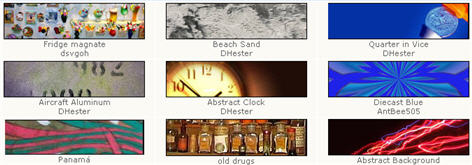
  2. Free Webpage Headers – A very nice collection of hundreds of 800 x 200 website headers which can easily be used for Blogger. Images are organized by category which makes it much easier to find what you’re looking for.
  3. Dreamstime – This is actually a pay for image site but they have a free images section you can benefit from. Click on the “Free Images” tab once you get to their home page.
  4. stock.xchng – By looking at the name of their site you wouldn’t think it was any good but looks can be deceiving. They’ve got thousands of free images that would work for your blog header or for inserting them into a blog post.
  5. Stock Vault – This free image site is dubbed the stock photo sharing website where designers and photographers can meet to share their images. Decent selection and more targeted towards designers but you might be able to find some goodies for your blog.
  6. FreeFoto – This last one is a bonus since the list was only supposed to be 5. It’s a pretty good site where you can find all sorts of images for your blog header, etc.

Premium Image Sites

Here’s some other sites that are great but you have to buy the images. In most cases it’s actually worth spending a few dollars just to get a perfect header image for your site. Remember, your blog is a representation of you so it’s a good idea to dress it up nicely.
fotolia logoshutterstock logocrestock logo

  1. Fotolia – This is my favorite stock image site since you can find some great unique blog header images for as little as $1. Easy sign up process and you buy credits once you setup your account.
  2. Stockxpert – Here’s another good one if you can’t find anything you like on Fotolia. Same plan since you pay per image starting at $1.
  3. Shutterstock – This site is different than others since you pay on monthly basis and can download up to 750 images over the course of 30 days. It’s great if you just need a ton of images in a short period. Sign up for one month, download your 750 max, and then cancel your account.
  4. Photo Library (also known as Index Stock) – It’s kind of hard to navigate their site but the images aren’t watermarked meaning you can right click and save them.
  5. Getty Images – This is truely the cream of the crop when it comes to high quality images. These images would be overkill for your personal blog but it’s still a beautiful site to check out.
  6. Photos.com – Another great high-end photo download site. You pay $99 per month but can download as many photos as you want. This is a great package for small businesses or corporations looking for stock photos for their website.
  7. Creastock.com – They offer royalty free high quality stock photos and images but their price point is a little higher than I prefer. This site is more for the true professional looking for really high quality art for their site.
This list should give you more than enough sites of places to get free images for your blog. I’d love to hear if you’ve got some other sites our readers might be interested in as well. Also, if you’ve pimped out your blog with a new header image post your link below to share with everyone!
Ready to super charge your blog? Check out our professional premium blogger templates or make money by joining our blog affiliate program!
If you like this post then please consider subscribing to our eBlog Templates RSS feed. You can also subscribe by email and have new templates and articles sent directly to your inbox.

Play Guitar Easly

Many people are aspiring to learn how to play the guitar. The guitar has risen into a certain level of popularity that it has become a symbol of talent, creativity and "coolness."
However, learning how to play the guitar is no joke. Learning to play the instrument requires one to learn how to play the chords. This article tries to give some helpful tips to individuals who would want to learn how to play guitar chords.
1. Get a chord chart
Playing guitar chords is just like playing chords in an organ. If one is learning to play the guitar alone (without a teacher), having a guitar chord book is his best bet. A guitar chord book demonstrates the different finger positions when playing different types of chords. The pressed strings are usually depicted with dots and the strings which are not supposed to be plucked are marked with an "x."
A chord book is a beginner's best friend. Memorizing chords without the help of a guitar teacher will be an impossible task if not for the chord book.
2. One at a time
There are dozens and dozens of different guitar chords which show themselves in different formations. Trying to memorize them in a single blow is close to impossible. Learning how to play guitar chords requires patience and lots of practice. Try practicing three chords that are can be played together (ex. A-E-D) on a single day and try to familiarize oneself with the transition between these chords. Don't try to take every chord in one sitting, it simply can't be done.
3. Be aware of the right hand
An important thing to remember when learning how to play guitar chords is that the movement of the right hand is as important as the movement of the left hand. Most beginners would find themselves taking breaks in strumming until the left hand positions itself properly for the next chord. This is normal during the first few day of practice, but at some point, the right hand should dictate the tempo of the movements of both hands. Strumming or plucking shouldn’t be delayed.
4. Listen to guitar-intensive songs whenever possible
One should learn how to play the guitar with some inspiration at the back of his head. Listening to good guitar players will give one some idea of where he would want to go in the future.
5. Learn the different forms of chords
As stated earlier, guitar chords present themselves in various forms. One should be familiar with the different forms so as to bring flexibility in to playing. One popular form of chords which is widely used in rock music is the "power chords" they are simply and heavy-sounding.
Playing guitar chords is not as hard as one would think. Learning to play guitar chords is a basic and essential part of guitar playing, it lays down the foundation of good guitar playing skills. If one has the perseverance and the passion to play the guitar, he will eventually learn how to play the chords and advance into more intricate lessons.

tips

Seven Tips on How to Get a Girlfriend


Are you tired of being the odd man out, the one that never seems to have a girlfriend?  If so, you will appreciate the information provided in this article.  Getting a girlfriend is not as difficult as it might seem, once you know how.  We have listed seven tips that will show you the steps you need to take to meet people and make an impression.
  1. Get Out – Let us face it, you are not going to meet anyone by staying home every Friday and Saturday night.  You have to get out of the house and go to places where single women hang out.  Keep in mind that in addition to bars and nightclubs, you can meet single women in a number of other places.  For example, woman love to shop so the mall is a good place.  Additionally, a dance event, charity event, or even cooking class will give you a head start.  You have to make yourself available first or you will never get a girlfriend.

  1. Approachability – Once you get out of the house, you have to make sure you are approachable.  If you sit at a table, hoping some beautiful woman will approach you but you are frowning, it will never happen.  Instead, you need to uncross your arms to get out of the protective mode, smile, and have fun.
  1. Be Yourself – Most importantly, be true to you.  The key here is not to change the person you are but to show off your best qualities.  If you are a mean sense of humor, use it.  If you are great at giving out genuine compliments, then do.  Be yourself while honing some of your lesser skills or qualities.

  1. Balance Body Language – Body language consists of 75% nonverbal and 25% verbal.  If your body language is anything other than this, you need to balance it out.  In other words, better body language and less nonsensical talk.
  1. Understand Body Language – After balancing your body language, you need to understand signals sent to you by women.  Unfortunately, this is challenging in that not all women use the same body language and often, it can be misunderstood.  However, if a woman looks at you, longer than a glance, if she crosses her legs toward you so they show a little, or if she winks at you, then interpretation is easy.  For this, you need to watch the woman for a while before making your approach.

  1. Communication – Unless you approach women, you will never know the truth of attraction.  You need to make an effort to talk to different women.  Sure, you make get shot down but what if you do not.  Take note of what she is doing to see if there are any connections.  If not, simply walk up and introduce yourself.
  1. Common Ground – Again, if you can find someone that has common interest, it would make her easier to approach.  For instance, you might talk about books, movies, sports, cooking, and so on until you find a common ground.

Manage band easly


  1. Step 1
    Make it clear to the band that you are working for them and that everyone gets an equal say. This squashes any ideas of you controlling anyone or anything.


  2. Step 2
    Set semi-regular "state of the band" meetings, whether after practice or before shows or some other time. This keeps everyone in the loop. If it isn't possible for everyone to get together, set up an email list so everyone can be in on decisions.


  3. Step 3
    Set up a spreadsheet with all club contacts, bookers, promotions people and assorted band helpers. This makes your job simpler when people need to be contacted.


  4. Step 4
    Try not to book a show in your town more than two times in a month, and spread out far enough so that there are at least 2 weeks before and after each show. This keeps people coming to shows and doesn't deplete your draw.


  5. Step 5
    Go to shows with your band members. When people know who you are, they are more willing to play shows with you and you might find a great contact for almost anything. The local scene in your area is always valuable to be involved in.


  6. Step 6
    Add your band to every social networking site you can find. This is crucial to finding new fans.


  7. Step 7
    Take as many pictures as possible at each show and post them on the social networking sites.


  8. Step 8
    Recruit fans to be your Street Team! They help spread the word and work for free (usually for stickers, shirts and free admission to shows).


  9. Step 9
    Find a graphic artist to create you an interesting eye catching logo. Art schools are good places to find people who will work for very cheap. They can also can do fliers for your shows to post all over town and the Internet.

10 things to do if your band want a famous

As well as 10 things bands can do to help them become famous, this could also be a list to help bands to try and make a living playing music. It’s not an easy road to go down, but in some cases, it can actually happen.
This list can be looked at as a work in progress as there are certainly more than 10 things to consider. Feel free to leave a comment if you want to contribute to the list.
10 things bands can do to help them become famous:
1. Make sure when coming up with a band name, that no one else is using it. It’s easy to do the research by searching Google, MySpace etc.
2. Write songs as often as you can.
3. Play as many gigs as you can get.
4. Get along with the band members.
5. Find a reputable booking agent.
6. Record a great demo, but don’t spend too much time or money on it. Preferably give it away for free at gigs to help get your name and music out there – or if you really don’t want to give your CDs away for free, sell them if you can, but it might not be easy if you’re just starting out. Also, slap some tunes up onto your MySpace page.
7. Keep an open mind. Sometimes there will be things that will come up that you may not have initially wanted to do, but if you broaden your perspective you may find that it could be for the best.
8. Practice.
9. Get in touch with bands that you like and are similar to your sound, and offer to support them at a gig or two.
10. Use social networks. Currently, the three best social networks for bands in my opinion, in order from best are: MySpace, Twitter, Facebook. There are more out there, but you’ll end up spending a lot of time juggling websites and it may become overwhelming … however, social networks are great for networking and meeting people who may end up as fans. Of course, you can always send your press releases/images and review requests to BandWeblogs.com!

fastest car on the world

11.22.2009

World's Fastest Cars

While most of us can only dream of owning the fastest car in the world, some will do whatever it takes to possess such speed and power.So, how fast are the fastest cars in the world? Here is the 10 fastest cars available on the market measures by top speed.
1. SSC Ultimate Aero: 257 mph, 0-60 in 2.7 secs. Twin-Turbo V8 Engine with 1183 hp, base price is $654,400. Tested in March 2007 by Guinness world records, The SSC Ultimate Aero takes the lead as the fastest car in the world beating Bugatti Veyron.
SSC Ultimate Aero Red doors open
2. Bugatti Veyron: 253 mph, 0-60 in 2.5 secs. Aluminum, Narrow Angle W16 Engine with 1001 hp, base price is $1,700,000. With the highest price tag, no wonder this is rank #2.
Bugatti Veyron front view driving
3. Saleen S7 Twin-Turbo: 248 mph, 0-60 in 3.2 secs. Twin Turbo All Aluminum V8 Engine with 750 hp, base price is $555,000. Smooth and bad-ass, will make you want to show it off non-stop.
Saleen S7 Twin Turbo dark orange front view
4. Koenigsegg CCX: 245 mph, 0-60 in 3.2 secs. 90 Degree V8 Engine 806 hp, base price is $545,568. Made in Sweden, it is aiming hard to be the fastest car in the world, but it has a long way to go to surpass the Bugatti and the Ultimate Aero.
Orange Koenigsegg CCX
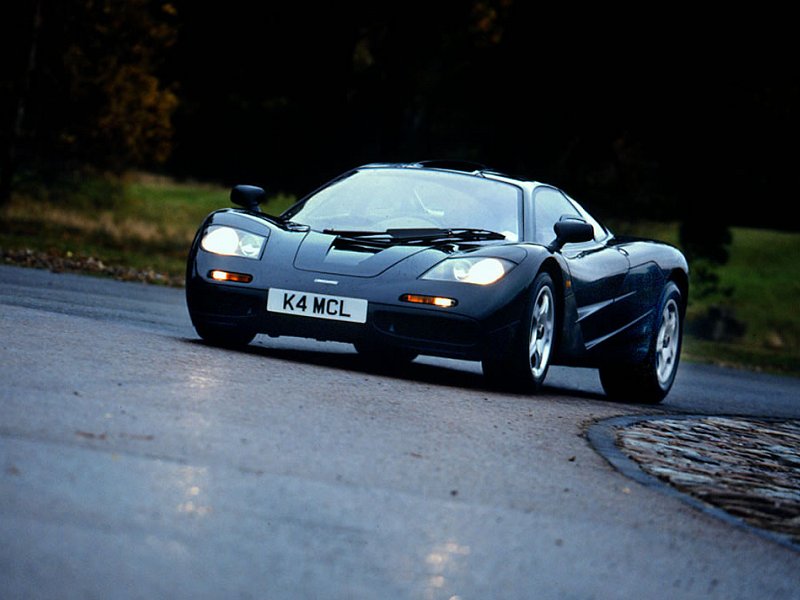
5. McLaren F1: 240 mph, 0-60 in 3.2 secs. BMW S70/2 60 Degree V12 Engine with 627 hp, base price is $970,000. Check out the doors, they looks like bat wings, maybe Batman need to order one and paints it black 1997 McLaren F1 on the road black
6. Ferrari Enzo: 217 mph, 0-60 in 3.4 secs. F140 Aluminum V12 Engine with 660 hp, base price is $670,000. Only 399 ever produced, the price goes up every time someone crashes.Ferrari Enzo doors open front view
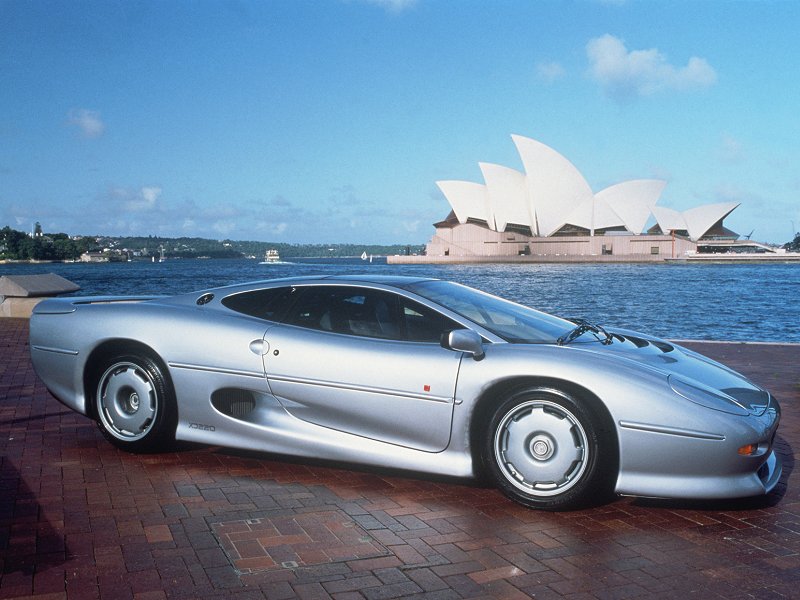
7. Jaguar XJ220: 217 mph, 0-60 in 3.8 secs. Twin Turbo V6 Engine with 542 hp, base price was $650,000. Made in 1992, this car still got what it takes to make the list.
Jaguar XJ220
8. Pagani Zonda F: 215 mph, 0-60 in 3.5 secs. Mercedes Benz M180 V12 Engine with 650 hp, base price is $667,321. With a V12 motor, this baby can do much better.pagani zonda f
9. Lamborghini Murcielago LP640: 211 mph, 0-60 in 3.3 secs. V12 Engine with 640 hp, base price is $430,000. Nice piece of art, the design is very round and smooth.
White Lamborghini Murcielago front view
10. Porsche Carrera GT: 205 mph, 0-60 in 3.9 secs. Aluminum, 68 Degree, Water Cooled V10 Engine with 612 hp, base price is $440,000. The most powerful and most expensive Porsche  nearly made the list as #10.
Red Porsche Carrera GT side view

December 19th, 2007  

World's famous man on the world

OF ALL TIME =
1.Neil Armstrong(Science)
2.Albert Einstein(Science)
3.Leonardo Da Vinci(Art)
4.Mahatma Gandhi(Politics)
5.Michael Jackson(Music)
6.Napoleon Bonapart(Politics)
7.Adolf Hitler(Politics)
8.Rabindranath Tagore(Literature)
9.William Shakespeare(Literature & Drama)
10.Sir Issac Newton(Science)
11.Max Delprior

Save your job from your computer

We all know how utterly frustrating it is to have an article suddenly disappear from our list on Ehow. Either a glitch causes it, or you lose one during Ehow's famous “article sweeps”. Here's my solution for this problem. This how to is for the computer Novice still learning about their computer.

Step 1
It is always a good idea to write your article before publishing it to Ehow on notepad, Microsoft Word, or Open Office. This will enable you to edit your articles beforehand but more importantly you can go ahead and save all of your work to your hard drive so that it can be recovered should it get lost or deleted online.
Step 2
Once your article is completed in your notepad etc. You will want to go up to the lefthand corner of your document and look for the word “file”. Click on this word and a new window will open up over your written work. With your cursor, scroll down to “save as”. Click on the “save as” and you will see yet again a new window pop up in front of your document. You will see in Large letters located at the top of this window the words SAVE AS, and below it “save in” and a drop down menu that will be titled “my documents”. Look down and you will see near the bottom of this window is two drop down menus. One says, “file name” with the word Untitled 1 in it. Here you will type in the name of yourarticle. Now, look at the drop down menu below this, it will say “Save As Type”. Go to the arrow on this drop down menu and scroll all the way until you see these words, Text (.txt).
Click on this link Your screen will blip for a second but then you see the Button to your right that says SAVE. Click on this. Yourarticle has now been saved to your hard drive.
Step 3
To save your articles you have already written on Ehow, you must go to the article page, and go to the bottom and copy and paste your entire article. Pull up your note pad after doing so.
Paste the entire article onto your notepad, and where you see an “X” on your notepad click this. A little window will pop up that will say, The text in the untitled page has changed. Do you wantto save? Click “yes”. A new window will pop up, and just as indicated earlier you will type the name of your article in the drop down menu where is says “file name”. You will then click “SAVE”. You have saved your ehow article to your hard drive. It will be located where you can find it in the My Documents section of your computer. To retrieve it, simply go to your start button on your computer, and go to My Documents. You can also go to the top of your page and right click on File and scroll to the word “open” and find it from the list that way.
Step 4
If your article gets lost or deleted, find your copy, and re title it and possibly edit it some more and then resubmit it.

How to do if your computer have a problem

Computer system

is prevalent everywhere and in every aspect of life. Today, every small and big scale industries have taken up to computer systems to manage, organize and flourish their work, with speed, reliability and consistency. Although we depend on computer systems to a large extent for solving our problems, still we do not pay much attention about the problems related to the computers. A computer problem, unless encountered by a user, he /she do not realize what effects it could have on their lives. Dealing with computer problems could be both time consuming and expensive, if not the mental agony of the user.

Various reasons can lead to a problem in computer systems. Computer problems can take place due to the faulty handling by the user or by some other unmanageable factors or a combination of the both. The malicious programs, more commonly known as viruses, spy-wares or malwares, which hinders the normal functioning of a computer, mainly gets into the system, through the internet or file sharing between different nodes. The other factors like heat or magnetism, static electricity shocks or power fluctuations, extreme accretion of dirt on the hardware or knocking or dropping the hard drive casing, incorrect or crashed software or an improper computer handling reasons to several computer problems.

When a PC system is encountered with a computer problem, its normal working is affected and its performance is compromised. The computer making quiet grumbling noises, the operating system taking too long to startup or shutdown, menus popping out, computer showing no signs of power at all, applications not working properly, frequent hanging of the system are some of the symptoms that signifies that the PC system is facing some computer problem. Computer problem could be either because of a fault with the hardware or a fault with the software.

There are some steps that can make sure that the computer system functions free of any error by fixing computer problems. The subsequent tips are a fundamental guideline that can be used to keep the PC maintained to run efficiently, increase component lifespan and also help in reducing the overall likelihood of PC problems. The number one reason for computer crashes is hardware conflict. Each hardware device communicates to other devices through an interrupt request channel (IRQ).

A user should keep back up of all essential data. It is one of most crucial steps. It prevents the data from getting lost or corrupted, when the computer is in state of malfunctioning. These data can be later restored after fixing computer problems. A user should have an antivirus installed in the computer, which can fix computer problems like malicious threats and bugs. It is recommended that the installed antivirus should be updated. The registered software is usually less crashed, and a user should always use registered software, in order to run the computer smoothly. The various hardware components like Monitor, Keyboard, Mouse, etc. should be kept clean. One should always keep the computer away from any magnetic fields. Thus when the computer is running out of problems one should get it fixed as quick as possible.

introduction for HTML

This is Primer #1 in a series of seven that will calmly introduce you to the very basics of HyperText Mark-up Language. I suggest you take the Primers one at a time over seven days. By the end of the week, you'll easily know enough to create your own HTML home page. No really. You will.
I say that because many people scoff at the notion that they can actually learn this new Internet format. I'm still amazed that the best-selling line of computer books calls its readers "Dummies." And people seem to revel in that title. Some of the smartest people I know love to proclaim themselves "Dummies" regarding every aspect of computers. Strange. I think you'll do a whole lot better at your next cocktail party by handing out your home page address rather than laughing about how dumb you are about the Internet.


You Can Do This!


Let's Get Started
I am assuming at the beginning of this tutorial that you know nothing about HTML. I am assuming, however, some computer knowledge. You wouldn't be looking at this page without having some knowledge. To continue with these Primers, you will need...
1. A computer (obviously)
2. A browser like Mozilla Firefox, Netscape Navigator, Microsoft Internet Explorer, or Opera. If you're looking at this page, you already have one. If you look up at the title bar at the very top of your screen it will probably say the page title ("Basic HTML: Introduction") and then your browser's name.
3. A word processor. If you have access to Windows "Notepad" or "WordPad" programs or the MAC "Simple Text" program, use that to get started.
If you have those three things, you can write HTML with the best of them. Now here are a few questions you probably have:
Q. I have a MAC (or PC) -- will this work on my computer?
A. Yes. HTML does not use any specific platform. It works with simple text. More on that in a moment...

Q. Must I be logged onto the Internet to do this? More specifically, will learning this throw my cost for on-line way up?
A. Neither. You will write off-line.

Q. Do I need some sort of expensive program to help me write this?
A. No. You will write using just what I outlined above. You can buy those programs if you'd like, but they're not needed. I've never used one.

Q. Is this going to require I learn a whole new computer language like Basic or Fortran or some other cryptic, God-awful, silly-lookin', gothic extreme gobbledygook?
A. Touchy-touchy, aren't we? "No" is the answer. HTML is not a computer language. Allow me to repeat that in bold... HTML is not a computer language!


What is HTML?
H-T-M-L are initials that stand for HyperText Markup Language (computer people love initials and acronyms -- you'll be talking acronyms ASAP). Let me break it down for you:


  • Hyper is the opposite of linear. It used to be that computer programs had to move in a linear fashion. This before this, this before this, and so on. HTML does not hold to that pattern and allows the person viewing the World Wide Web page to go anywhere, any time they want.


  • Text is what you will use. Real, honest to goodness English letters.


  • Mark up is what you will do. You will write in plain English and then mark up what you wrote. More to come on that in the next Primer.


  • Language because they needed something that started with "L" to finish HTML and Hypertext Markup Louie didn't flow correctly. Because it's a language, really -- but the language is plain English.


  • Beginning to Write
    You will actually begin to write HTML starting with Primer #2. That's tomorrow if you follow the seven-day plan this was written for. Here, I want to tell you how you will go about the process.
    You will write the HTML document on the word processor, or Notepad, WordPad, or Simple Text. When you are finished creating the HTML document, you'll then open the document in a browser, like Netscape Navigator. The browser will interpret the HTML commands for you and display the Web page.
    Now, some people who are already schooled in HTML are going to jump up and down and yell that you should be using an HTML assistant program because it makes it easier. That's true, but it also makes it harder to learn as the program does half the work for you. Take my word for it, use the word processor for a week, then go to the assistant if you still want to use one. You'll be far better off for the effort. I have been writing HTML for six years and I still use Notepad for the bulk of my writing.


    Let's get into the programs you will use to write your HTML document. Keep this in mind: HTML documents must be text only. When you save an HTML document, you must save only the text, nothing else.
    The reason I am pushing NotePad, WordPad, and Simple Text is that they save in text-only format without your doing any additional work. They just do it. But, if you're like me, then you will want to start writing on a word processor, like WORD, or WordPerfect. Maybe you're just more comfortable on it. If so, read this next part carefully.
    The Word Processor
    When you write to the word processor you will need to follow a few steps:
    1. Write the page as you would any other document.
    2. When you go to save the document (Here's the trick), ALWAYS choose SAVE AS.
    3. When the SAVE AS box pops up, you will need to save the page in a specific format. Look at the SAVE AS dialogue box when it pops up: Usually at the bottom, you find where you will be able to change the file format.
    4. If you have a PC, save your document as ASCII TEXT DOS or just TEXT. Either one will work.
    5. If you have a MAC, save your document as TEXT.
    6. When I started writing HTML, I saved pages by assigning every Web page its own floppy disc. It just helped me keep it all straight, but if you want to save right to your hard drive, do it. I only offer the floppy disc premise as a suggestion.
    Please remember: It is very important to choose SAVE AS EVERY time you save your document. If you don't, the program won't save as TEXT, but rather in its default format. In layman's terms -- use SAVE AS or screw up your document.
    You see, when you save your document in WORD, or some other word processor format other than text, you are saving much more than just the letters on the page. You're saving the margin settings, the tab settings, specific fonts, and a whole lot of other settings the page needs to be displayed correctly. You don't want all of that. You just want the text.
    NotePad, WordPad, and SimpleText already save in text-only format so if you use one of them as your word processor, you'll get the correct format simply by saving your document.


    How To Name Your Document
    What you name your document is very important. You must first give your document a name and then add a suffix to it. That's the way everything works in HTML. You give a name and then a suffix.
    Follow this format to name your document:
    1. Choose a name. Anything. If you have a PC not running Windows 95, you are limited to eight letters, however.
    2. Add a suffix. For all HTML documents, you will add either ".htm" or ".html".
    (".htm" for PCs running Windows 3.x and ".html" for MAC and Windows 95/98 Machines)
    Example:
    I am looking to name a document I just wrote on a PC running Windows 3.11 for workgroups. I want to name the document "fred". Thus the document must be named "fred.htm". If it was MAC or Windows 95/98 I would name it "fred.html". Please notice the dot (period) before .htm and .html. And no quotation marks, I just put them in here to set the name apart.
    Uhhhhhh.... Why Do I Do That?
    Glad you asked. It's a thing called "association." It's how computers tell different file types apart. ".html" tells the computer that this file is an HTML document. When we get into graphics, you'll see a different suffix. All files used on the Web will follow the format of "name.suffix." Always.
    Okay, why .htm for PCs running Windows 3.x and .html for MAC and Windows 95/98?
    Because that's the way the operating systems are made (Windows 3.x, Windows 95/98, and MAC OS are all technically called operating systems). Windows 3.x only allows three letters after the dot. MAC OS and Windows 95/98 allow four, or more. Your browser allows for both suffixes. It acts upon .html and .htm in the same fashion.


    Why do you keep harping on the fact that I must save in TEXT only?
    You're just full of questions! You see, HTML browsers can only read text. Look at your keyboard. See the letters and numbers and little signs like % and @ and *? There are 128 in all (read upper- and lowercase letters as two). That's text. That's what the browser reads. It simply doesn't understand anything else.
    If you'd like to test this theory, then go ahead and create an HTML document and save it in WORD. Then try and open it in your browser. Nothing will happen. Go ahead and try it. You won't hurt anything.
    Remember that if you are using Notepad, Wordpad, or Simple Text, the document will be saved as text with no extra prompting. Just choose SAVE.


    Opening the Document in the Browser
    Once you have your HTML document on the floppy disc or your hard drive, you'll need to open it up in the browser. It's easy enough. Since you're using a browser to look at this Primer, follow along.
    1. Under the FILE menu at the very top left of this screen, you'll find OPEN, OPEN FILE, OPEN DOCUMENT, or words to that effect.
    2. Click on it. Some browsers give you the dialogue box that allows you to find your document right away. Internet Explorer, and later versions of Netscape Navigator, require you to click on a BROWSE button or OPEN FILE button to get the dialogue box. When the dialogue box opens up, switch to the A:\ drive (or the floppy disc for MAC users) and open your document. If you saved the file to your hard drive, get it from there.
    3. You might have to then click an OK button. The browser will do the rest.


    One More Thing
    You easily have enough to keep you occupied for the first day. Don't worry, the Primers get less wordy after this.
    If you are going to start writing HTML, I suggest you make a point of learning to look at other authors' HTML pages. You say you're already doing that, right? Maybe. What I mean is for you to look at the HTML document a person wrote to present the page you are looking at. Don't look at the pretty page, look behind it at the HTML document.
    Why Would I Do That?
    Because you can... but seriously, folks. Let's say you run into a page that has a really neat layout, or a fancy text pattern, or a strange grouping of pictures. You'd like to know how to do it.
    Well, look, I'm not telling you to steal anything, but let's be honest, if you see some landscaping you like, you're going to use the idea. If you see a room layout you like, you will use the idea to help yourself. That's the point of looking at another page's HTML document. I think it's also the best way to learn HTML. In fact, I am self-taught in HTML simply by looking at others' documents. It was the long way around, believe me. You're going to have a much easier time of it with these Primers.
    Here's how you look at an HTML document (known as the "source code"):
    1. When you find a page you like, click on VIEW at the top of the screen.
    2. Choose DOCUMENT SOURCE from the menu. Sometimes it only reads SOURCE.
    3. The HTML document will appear on the screen.
    4. Go ahead. Try it with this page. Click on VIEW and then choose the SOURCE.
    It's going to look like chicken-scratch right now, but by the end of the week, it'll be readable and you'll be able to find exactly how a certain HTML presentation was performed.
    It's A Little Different On AOL
    Those of you who use AOL can also see the source. You can do it by placing your pointer on the page, off of an image, and clicking the right mouse button. MAC users should click and hold. A small menu should pop up. One of the items will allow you the ability to view the source.
    That's the Primer for today. Print it out if you'd like and get ready to delve in and write your first HTML document. See you tomorrow.